
The Customizer backend is responsible for storing detailed information about the custom product architecture — defining how products are built, which components are customizable, and potential customization options.
Customizer’s flexible data model provides a way to configure a large variety of products. At the core, products are defined by the following elements:
-
Component definitions
-
Component options
-
Component placements
-
Products
-
Product versions
Or represented visually:
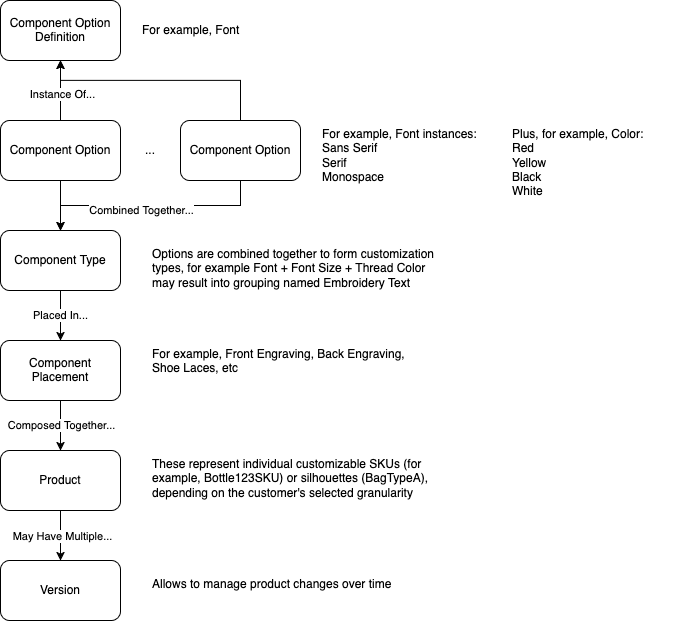
Component definitions
Component definitions identify the most basic building block of products: types or classes or “archetypes” inside the product model.
For example:
-
Definition
Fontto represent all selectable font options -
Definition
Thread Brandto represent threads brands
Component options
Component options are instances of definitions. These elements are usually surfaced inside the user experience to give consumers to a way to update product configuration.
For example:
-
Sans Serif,Serif,Monospacecan be options of typeFont
Product silhouettes
Customizer defines customizable products. In some cases, it may be preferred to group together similar products and manage them at a higher level. For example, a customizable wallet may have several variations:
-
May have several colors
-
May be made of varying materials
-
May have options, such as included Apple Tag
In this case, it may be more efficient to manage customization options at the higher level by defining a Wallet product — aka product silhouette or a product group. Various valid configuration options combinations may then be mapped to specific SKUs in the product catalogs.
For example:
Wallet product…
… has Color options
… has Material options
… has Apple Tag option
… where Tan + Leather + No Apple Tag option maps to SKU 123
Component types
Component types are a way to group multiple definitions that typically “go-together” and should be configured at the same to provide a complete customized product.
For example, Digital Printing Text typically required a selection of a font, font size, direction, etc. to provide valid instructions to printing machines.
Component placements
Component placements are customizable parts of a product, and are based on a component type that can be accepted by the placement. Multiple placements can be based on the same component type.
Components
Similar to how component options are instances of option definitions, components are concrete instances of component types. These are the most specific objects within the Customizer object model. For example:
If configured as:
-
Script Font and Serif Font are component options
-
Color Red, Color Black are also component options
Then components could be:
-
Serif Font + Color Red
-
Serif Font + Color Black
-
Script Font + Color Red
-
etc
Components are not configured directly, but rather generated automatically based on the product package configuration through packages system.
Components are typically invisible for both front-end and back-end UIs, but are important for a couple of reasons:
-
These are the concrete instances that are being selected in placements. Following the example above, Text Layer 1 placement may be assigned Script Font + Color Red option
-
Components are important for the extensibility model as they inherit a number of attributes from other objects of the hierarchy.
Packages
Packages define valid combinations of component options that could be placed into component placements.
Products
Products in Customizer typically map to customizable products inside the eCommerce catalog. A product is a container that combines several placements into the final configurable object:
For example, a Stainless 32oz Bottle as R1234 product may consist of:
-
Product placement to select the product color
-
Image 1 through Image 9 placement to upload multiple images
-
Text 1 through Text 9 placement to configure text layers etc
Product versions
Product versions allow to manage product changes over time, where a single product still retaining the same product ID and style codes but having a somewhat different configuration:
-
A Shoe product may have 2018 and 2019 versions
Blueprints
Blueprints are JSON objects that snapshot the requested product model. Blueprints are generated by the product API and used by the widget or other custom code to display customization experiences, provide options selection UI, etc.
Blueprints are specific the list of products, product versions, and sites.