Skip table of contents

Salesforce B2C Commerce Cloud

Connecting to Commerce Cloud catalog data

Shop API

Shop API allows Customizer to retrieve real-time information about product prices and availability from the end-user point of view. When using the Shop integration, Customizer will be able to retrieve pricing as it applies to the consumer who is currently designing a custom product, including any promotions, cart discounts, and customer groups that apply. Customerize will also retrieve real-time inventory availability of products, just like the regular storefront.

In order to create a Shop API integration, several steps would need to be completed on the Salesforce side.

Create an Open Commerce API account

  • Navigate to https://account.demandware.com and login with a user that has administrative or user management permissions

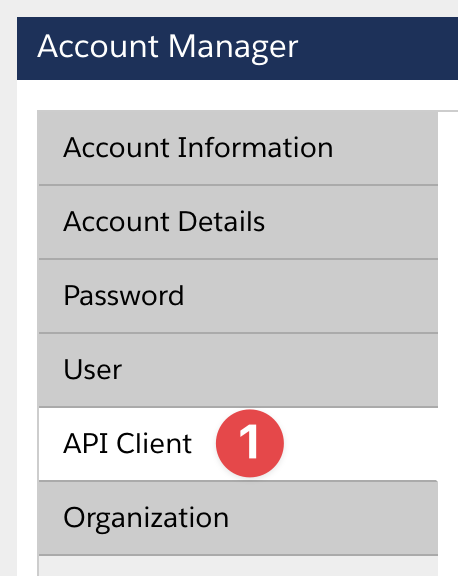
  • Navigate to the API Client area

  • Select Add API Client action

  • Populate API client details, such as:

    • Client name

    • Password

    • Organization

Other fields can be left as default values

The same API client can be used for both Shop and Data API integration. In that case, please make sure to save the selected password: while Shop integration will not need a password, Data API requires it.

  • Save

  • Communicate the API client ID and Password to your integration team

Populate Shop API settings for product only

If only the product data integration required with add-to-cart action handled through difference means, please the OCAPI configuration described in this section. If the Customizer widget is to handle the add-to-cart action, please see the next section.

Please refer to Salesforce Commerce Cloud documentation for additional education and details: https://developer.salesforce.com/docs/commerce/b2c-commerce/references/b2c-commerce-ocapi/ocapisettings.html

In order to populate OCAPI settings:

  • Please note that your Commerce Cloud may already have an existing OCAPI configuration. In that case, the Customizer configuration block will need to be merged with the previous configuration

  • Replace CLIENT-ID placeholder with the API Client ID generated in the previous step

  • Replace SITE-URLS placeholder with the required site URLs.

    • The OCAPI settings are environment-specific, thus the list of URLs would need to be updated separately for each environment.

  • Navigate to Business Manager → Administration → Site Development → Open Commerce API Settings

  • Select Shop type

  • Select global or site-specific context

  • Update the configuration section

Example OCAPI Configuration for product catalog access only
JSON
{
    "_v": "23.1",
    "clients":
    [
        {
            "client_id": "CLIENT-ID",
            "allowed_origins":
            [
                "SITE-URLS"
            ],
            "resources":
            [
                {
                    "resource_id": "/categories/*",
                    "read_attributes": "(**)",
                    "write_attributes": "(**)",
                    "methods":
                    [
                        "get"
                    ],
                    "cache_time": 900
                },
                {
                    "resource_id": "/products/*",
                    "read_attributes": "(**)",
                    "write_attributes": "(**)",
                    "methods":
                    [
                        "get"
                    ],
                    "cache_time": 900
                },
                {
                    "resource_id": "/product_search",
                    "read_attributes": "(**)",
                    "write_attributes": "(**)",
                    "methods":
                    [
                        "get"
                    ],
                    "cache_time": 900
                },
                {
                    "resource_id": "/products/*/images",
                    "read_attributes": "(**)",
                    "write_attributes": "(**)",
                    "methods":
                    [
                        "get"
                    ],
                    "cache_time": 900
                },
                {
                    "resource_id": "/product_search/*",
                    "read_attributes": "(**)",
                    "write_attributes": "(**)",
                    "methods":
                    [
                        "get"
                    ],
                    "cache_time": 900
                }
            ]
        }
    ]
}

Populate Shop API settings for cart integration

If add-to-cart functionality is desired, please follow the steps from the previous section, but use the following configuration snippet. This snippet adds endpoint permissions required for the cart access, including item retrieval and send-to-cart action.

Cart integration is required for edit-from-cart functionality, unless item details are provided to the widget through other means.

Shop API settings for catalog and cart integration
JSON
{
    "_v": "23.1",
    "clients":
    [
        {
            "client_id": "CLIENT-ID",
            "allowed_origins":
            [
                "SITE-URLS"
            ],
            "resources":
            [
                {
                    "resource_id": "/categories/*",
                    "read_attributes": "(**)",
                    "write_attributes": "(**)",
                    "methods":
                    [
                        "get"
                    ],
                    "cache_time": 900
                },
                {
                    "resource_id": "/products/*",
                    "read_attributes": "(**)",
                    "write_attributes": "(**)",
                    "methods":
                    [
                        "get"
                    ],
                    "cache_time": 900
                },
                {
                    "resource_id": "/product_search",
                    "read_attributes": "(**)",
                    "write_attributes": "(**)",
                    "methods":
                    [
                        "get"
                    ],
                    "cache_time": 900
                },
                {
                    "resource_id": "/products/*/images",
                    "read_attributes": "(**)",
                    "write_attributes": "(**)",
                    "methods":
                    [
                        "get"
                    ],
                    "cache_time": 900
                },
                {
                    "resource_id": "/product_search/*",
                    "read_attributes": "(**)",
                    "write_attributes": "(**)",
                    "methods":
                    [
                        "get"
                    ],
                    "cache_time": 900
                },
                {
                    "resource_id": "/baskets",
                    "methods":
                    [
                        "post",
                        "options"
                    ],
                    "read_attributes": "(**)",
                    "write_attributes": "(**)"
                },
                {
                    "resource_id": "/baskets/*",
                    "methods":
                    [
                        "post",
                        "options",
                        "get",
                        "patch"
                    ],
                    "read_attributes": "(**)",
                    "write_attributes": "(**)"
                },
                {
                    "resource_id": "/baskets/*/items",
                    "methods":
                    [
                        "post",
                        "options"
                    ],
                    "read_attributes": "(**)",
                    "write_attributes": "(**)"
                },
                {
                    "resource_id": "/customers",
                    "methods":
                    [
                        "post",
                        "options"
                    ],
                    "read_attributes": "(**)",
                    "write_attributes": "(**)"
                },
                {
                    "resource_id": "/customers/*",
                    "methods":
                    [
                        "post",
                        "options"
                    ],
                    "read_attributes": "(**)",
                    "write_attributes": "(**)"
                },
                {
                    "resource_id": "/customers/*",
                    "methods":
                    [
                        "get"
                    ],
                    "read_attributes": "(**)"
                },
                {
                    "resource_id": "/customers/auth/*",
                    "methods":
                    [
                        "post",
                        "options"
                    ],
                    "read_attributes": "(**)",
                    "write_attributes": "(**)"
                },
                {
                    "resource_id": "/customers/*/auth",
                    "methods":
                    [
                        "post",
                        "options"
                    ],
                    "read_attributes": "(**)",
                    "write_attributes": "(**)"
                },
                {
                    "resource_id": "/customers/*/baskets",
                    "methods":
                    [
                        "get"
                    ],
                    "read_attributes": "(**)",
                    "write_attributes": "(**)"
                }
            ]
        }
    ]
}

Populate Shop API settings for catalog, cart, and wishlist access

Finally, the most complete configuration snippet that is required when using the full set of integration features can be found below:

Complete Shop API settings for catalog, cart, and wishlist access
JSON
{
    "_v": "23.1",
    "clients":
    [
        {
            "client_id": "CLIENT-ID",
            "allowed_origins":
            [
                "SITE-URLS"
            ],
            "resources":
            [
                {
                    "resource_id": "/categories/*",
                    "read_attributes": "(**)",
                    "write_attributes": "(**)",
                    "methods":
                    [
                        "get"
                    ],
                    "cache_time": 900
                },
                {
                    "resource_id": "/products/*",
                    "read_attributes": "(**)",
                    "write_attributes": "(**)",
                    "methods":
                    [
                        "get"
                    ],
                    "cache_time": 900
                },
                {
                    "resource_id": "/product_search",
                    "read_attributes": "(**)",
                    "write_attributes": "(**)",
                    "methods":
                    [
                        "get"
                    ],
                    "cache_time": 900
                },
                {
                    "resource_id": "/products/*/images",
                    "read_attributes": "(**)",
                    "write_attributes": "(**)",
                    "methods":
                    [
                        "get"
                    ],
                    "cache_time": 900
                },
                {
                    "resource_id": "/product_search/*",
                    "read_attributes": "(**)",
                    "write_attributes": "(**)",
                    "methods":
                    [
                        "get"
                    ],
                    "cache_time": 900
                },
                {
                    "resource_id": "/baskets",
                    "methods":
                    [
                        "post",
                        "options"
                    ],
                    "read_attributes": "(**)",
                    "write_attributes": "(**)"
                },
                {
                    "resource_id": "/baskets/*",
                    "methods":
                    [
                        "post",
                        "options",
                        "get",
                        "patch"
                    ],
                    "read_attributes": "(**)",
                    "write_attributes": "(**)"
                },
                {
                    "resource_id": "/baskets/*/items",
                    "methods":
                    [
                        "post",
                        "options"
                    ],
                    "read_attributes": "(**)",
                    "write_attributes": "(**)"
                },
                {
                    "resource_id": "/customers",
                    "methods":
                    [
                        "post",
                        "options"
                    ],
                    "read_attributes": "(**)",
                    "write_attributes": "(**)"
                },
                {
                    "resource_id": "/customers/*",
                    "methods":
                    [
                        "post",
                        "options"
                    ],
                    "read_attributes": "(**)",
                    "write_attributes": "(**)"
                },
                {
                    "resource_id": "/customers/*",
                    "methods":
                    [
                        "get"
                    ],
                    "read_attributes": "(**)"
                },
                {
                    "resource_id": "/customers/auth/*",
                    "methods":
                    [
                        "post",
                        "options"
                    ],
                    "read_attributes": "(**)",
                    "write_attributes": "(**)"
                },
                {
                    "resource_id": "/customers/*/auth",
                    "methods":
                    [
                        "post",
                        "options"
                    ],
                    "read_attributes": "(**)",
                    "write_attributes": "(**)"
                },
                {
                    "resource_id": "/customers/*/baskets",
                    "methods":
                    [
                        "get"
                    ],
                    "read_attributes": "(**)",
                    "write_attributes": "(**)"
                },
                {
                    "resource_id": "/customers/*/product_lists",
                    "methods":
                    [
                        "get"
                    ],
                    "read_attributes": "(**)",
                    "write_attributes": "(**)"
                },
                {
                    "resource_id": "/customers/*/product_lists/*",
                    "methods":
                    [
                        "get"
                    ],
                    "read_attributes": "(**)",
                    "write_attributes": "(**)"
                },
                {
                    "resource_id": "/customers/*/product_lists/*/items",
                    "methods":
                    [
                        "get"
                    ],
                    "read_attributes": "(**)",
                    "write_attributes": "(**)"
                }
            ]
        }
    ]
}

Data API

Unlike Shop API, which provides a “shoppable” view of the product catalog, Data API provides raw accent to the product data:

  • Products in hidden categories

  • Products that are marked offline or with a future activation date

  • Products regardless of their inventory state

This allows teams to import products that are not yet available for sale, such as those being tested or being prepared for future launch dates.

Create an Open Commerce API Account

Please follow the instructions in the previous section to create new API Client or reuse an existing one.

Populate Data API settings

In order to populate OCAPI settings:

  • Please note that your Commerce Cloud may already have an existing OCAPI configuration. In that case, the Customizer configuration block will need to be merged with the previous configuration

  • Replace CLIENT-ID placeholder with the API Client ID generated in the previous step

  • Replace SITE-URLS placeholder with the required site URLs.

    • The OCAPI settings are environment-specific, thus the list of URLs would need to be updated separately for each environment.

  • Navigate to Business Manager → Administration → Site Development → Open Commerce API Settings

  • Select Data API type

  • Select global or site-specific context

  • Update the configuration section

Sample Data API snippet for catalog integration
JSON
{
    "_v": "23.1",
    "clients":
    [
        {
            "client_id": "CLIENT-ID",
            "allowed_origins":
            [
                "SITE-URLS"
            ],
            "resources":
            [
                {
                    "resource_id": "/catalogs/*/categories",
                    "read_attributes": "(**)",
                    "write_attributes": "(**)",
                    "methods":
                    [
                        "get"
                    ],
                    "cache_time": 900
                },
                {
                    "resource_id": "/catalogs/*/categories/*",
                    "read_attributes": "(**)",
                    "write_attributes": "(**)",
                    "methods":
                    [
                        "get"
                    ],
                    "cache_time": 900
                },
                {
                    "resource_id": "/products/*",
                    "read_attributes": "(**)",
                    "write_attributes": "(**)",
                    "methods":
                    [
                        "get"
                    ],
                    "cache_time": 900
                },
                {
                    "resource_id": "/product_search",
                    "read_attributes": "(**)",
                    "write_attributes": "(**)",
                    "methods":
                    [
                        "post"
                    ],
                    "cache_time": 900
                }
            ]
        }
    ]
}
JavaScript errors detected

Please note, these errors can depend on your browser setup.

If this problem persists, please contact our support.